Up to now, I have never been a fan of Satnav. Watching motorists looking at a small screen on the dash instead of looking out for me on the bike scared me from the moment they became commonplace.
However, there's none so pious as the converted and an "incident" in Germany where my passenger's newly acquired Garmin was hastily unboxed and fired up started me on the path to richeousness. I was already looking for a new mobile phone and built in GPS moved from the "nice to have" category into a requirment.
I've been looking at the commercial software options but at the moment, most seem to have one disadvantage or another - they don't use the E90's internal screen, they can't use the internal GPS or worst of all, they are "locked" to the memory card they are supplied on. However, Nokia Maps has the answer for me. Although it can download maps on the fly (if you have a suitable data tariff) it is also possible to install the maps to the device using Nokia's "Maploader" software, a far better solution.
"Turn by turn" voice guidance is not a standard feature (nor is route planning in V2 of the software) but you can add it when required for a small fee - currently £6 for a month (UK only). This suits me fine as most of the time I know where I'm going. I'll certainly buy a month's licence for Europe when I go on holiday in August.
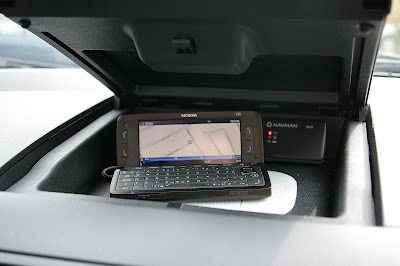
In the Mazda 2 which is "fully fitted" for the phone it's excellent. I keep the Navman B10 external GPS receiver in this car which means faster satelite "lock on" and there is now 12v power in the top glovebox so I can use the E90 open or closed when navigating. Despite the increased screen area of the internal screen, I find myself more likely to leave the phone in the cradle. This is because the small fonts are difficult to read and it's also harder to operate the controls on the keyboard when it is sitting flat on the dash.
I tried to be clever yesterday in Coventry and Nokia maps certainly saved me. I had previously saved a long term car park into favorites and was heading for my destination when I saw a sign for car parking at the venue I was attending. I ignored the SatNav, followed the sign then found that the car park was full and then simply re-searched on my original destination to get me back on track. Without the Satnav I would have been lost in Coventry's city centre.
It integrates well with the Visorlite and although I have nothing really to compare it to, "it does what it says on the tin". When I have used it on routes that I know and chosen to ignore, it recalculates quickly without telling me to U-turn. It gives instructions in good time and tells you to "keep left" as appropriate on merging motorways. Even in the upright cradle on the external screen, the details at the bottom are too small (time/distance to destination and current speed) but the mapping and directions are clear enough. It's best to turn off the various points of intetrest like petrol stations and garages as the small screen can get crowded.
It's a pity the call/hang up buttons don't work while navigating, you have to "long press" on the menu key to get back to the standby screen but otherwise it's fine.
Last week I was driving our other car, a Mazda 5. This has no provision for phone at all. All I did was put the Visorlight on the sunvisor and kept the phone in my pocket using the internal GPS only. As an example of the effortless use of modern technology it was peerless. Although I didn't have a screen to look at, navigation commands came clearly through the Visorlight.
I don't know how I ever managed without GPS. The licensing model may not suit everybody but until a "perfect" E90 solution appears, Nokia Maps will do for me.


 That's a Navman B10 external bluetooth receiver sitting just behind the E90. I'll report on that later - but it was certainly a wise buy despite the internal GPS of the E90.
