Showing posts with label E90. Show all posts

Wednesday, 25 June 2008

Nokia E90 and Nokia Maps - Satnav for people who don't want a Satnav

Up to now, I have never been a fan of Satnav. Watching motorists looking at a small screen on the dash instead of looking out for me on the bike scared me from the moment they became commonplace.

However, there's none so pious as the converted and an "incident" in Germany where my passenger's newly acquired Garmin was hastily unboxed and fired up started me on the path to richeousness. I was already looking for a new mobile phone and built in GPS moved from the "nice to have" category into a requirment.

I've been looking at the commercial software options but at the moment, most seem to have one disadvantage or another - they don't use the E90's internal screen, they can't use the internal GPS or worst of all, they are "locked" to the memory card they are supplied on. However, Nokia Maps has the answer for me. Although it can download maps on the fly (if you have a suitable data tariff) it is also possible to install the maps to the device using Nokia's "Maploader" software, a far better solution.

"Turn by turn" voice guidance is not a standard feature (nor is route planning in V2 of the software) but you can add it when required for a small fee - currently £6 for a month (UK only). This suits me fine as most of the time I know where I'm going. I'll certainly buy a month's licence for Europe when I go on holiday in August.

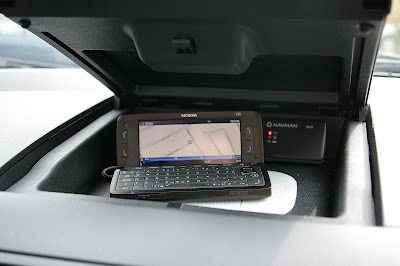
In the Mazda 2 which is "fully fitted" for the phone it's excellent. I keep the Navman B10 external GPS receiver in this car which means faster satelite "lock on" and there is now 12v power in the top glovebox so I can use the E90 open or closed when navigating. Despite the increased screen area of the internal screen, I find myself more likely to leave the phone in the cradle. This is because the small fonts are difficult to read and it's also harder to operate the controls on the keyboard when it is sitting flat on the dash.
I tried to be clever yesterday in Coventry and Nokia maps certainly saved me. I had previously saved a long term car park into favorites and was heading for my destination when I saw a sign for car parking at the venue I was attending. I ignored the SatNav, followed the sign then found that the car park was full and then simply re-searched on my original destination to get me back on track. Without the Satnav I would have been lost in Coventry's city centre.

It integrates well with the Visorlite and although I have nothing really to compare it to, "it does what it says on the tin". When I have used it on routes that I know and chosen to ignore, it recalculates quickly without telling me to U-turn. It gives instructions in good time and tells you to "keep left" as appropriate on merging motorways. Even in the upright cradle on the external screen, the details at the bottom are too small (time/distance to destination and current speed) but the mapping and directions are clear enough. It's best to turn off the various points of intetrest like petrol stations and garages as the small screen can get crowded.

It's a pity the call/hang up buttons don't work while navigating, you have to "long press" on the menu key to get back to the standby screen but otherwise it's fine.

Last week I was driving our other car, a Mazda 5. This has no provision for phone at all. All I did was put the Visorlight on the sunvisor and kept the phone in my pocket using the internal GPS only. As an example of the effortless use of modern technology it was peerless. Although I didn't have a screen to look at, navigation commands came clearly through the Visorlight.

I don't know how I ever managed without GPS. The licensing model may not suit everybody but until a "perfect" E90 solution appears, Nokia Maps will do for me.

Saturday, 10 May 2008

Nokia Sportstracker - The GP800 and the E90 get it together

I was aware of the existence of Nokia Sportstracker but I noticed it again recently when I added Nokia Communication Center to my PC Suite from the Nokia Beta labs. As I'm trying to cycle to work at least once a week I thought I'd give it a go.


Of course it works however you're moving so I've been testing while riding the GP800 and it provides a datalog that you can very easily upload to the Nokia Sportstracker website at http://sportstracker.nokia.com/ directly from the phone. It's a pity the E90 takes a while to lock on to satelites so I may take to carrying my Navman B10 external bluetooth receiver in my pocket to speed things up. Once locked on it stays running in the background even on the one and a half hour trip from Ashford, Kent back home to Stanmore, Middx.

It can save "routes" so you get a comparison of your performance over time and it includes "altitude" which will be usefull when cycling to see where the hills are. It plots both against distanc eand time on the graph and map as well as identifying the fastest, slowest highest and lowest points on the journey.


This is a useful piece of software from Nokia and best of all, it's free.

Friday, 18 April 2008

Nokia E90 - T9 Predictive Text

Like many people who crave smartphones with QWERTY keyboards, I have always been "sniffy" about predictive text. Even with early predicitve text equipped phones I simply switched if off - or disabled it in settings as soon as possible. However, time has marched on and predictive text in it's latest T9 guise is actually quite clever. I tend to get most of my Symbian related news and info from the very fine All About Symbian website and recently, this thread was posted in the forum http://www.blogger.com/T9%20Thread%20on%20All%20About%20Symbian. So in the spirit of investigation, I turned it on on the E90 and was singularly unimpressed. But I persevered, and it suddenly became clear. Here's my "T9 in easy steps"

  1. Press the numeric button which contains the letter you want once for each letter, ignore what's displayed on the screen until you get to the end of your word. If it's correct, press 0 to accept it, put in a space and move to the next word.
  2. If when you get to the end of the word it's wrong, press * to cycle through the possiblities. When you get to the right one press 0 to accept it. When the dictionary runs out of alternatives, it will offer you the opportunity to "spell" (in multitap) the word and add it to the dictionary.
  3. For words with apostrophes (Don't, her's etc) press the 1 after the "Don" and the screen will display a full stop. Simply enter the t (or s) and the full stop will automatically change to an apostrophe.
  4. For numbers press and hold the appropriate button.
  5. For other punctuation, press and hole the 1 button
  6. That's it. There is a way to do "smileys" but I guess if you're like me, the point is to write gramatically correct English not "txt spk" so smileys aren't really in the picture.

I'll still use the QWERTY for e-mails and longer messages but for short SMS text messages, I'm now converted to T9. I'm sure an eight year old can multitap faster but for me, T9 has made life simpler and given me a new option for entering text.

I'm converted - T9 rocks.

Sunday, 6 April 2008

Nokia E90 In the car - Handsfree Issues


I have always preferred a wired "boom" headset for use in the car. Even after Bluetooth became common, I stuck with the Jabra Earwave with my Sony Ericsson P900 and Nokia E70 just as I had with earlier phones.


When combined with an active cradle, it always seemed to me to be the optimim solution - no power issues, no pairing issues, just reliable connectivity. What's more, the boom ensured good quality reception of my voice even in a small car at speed on a motorway (where wind noise is often as intrusive as the sound of a straining engine - small cars do not have the same "serenity" as a large car)
Once I had the E90, I knew that an alternative was required. The port for the supplied stereo headset is not compatible with any 3rd party wired boom headset that I could find and I didn't fancy trying to fabricate something myself given the thinness of the wires involved.

While I was searching for (and getting blank looks in Carphone Warehouse et al) a wired headset, a number of people had pointed me in the direction of a Bluetooth "visor" handsfree so I started researching.

There are a shedload of different types out there but I settled on the Supertooth Light - so far I'm delighted. http://www.supertooth.net/htmls/supertooth_light.html It seems well made, pairs with the E90 first time every time and charges via a mini USB plug which means it can share a charger with my Navman B10 Blutooth GPS receiver.

I always send/end using the phone itself so any fragility in its magnetic attraction to the sunvisor is not a problem. Sound levels are fine and callers seem to be able to hear me perfectly well although the microphone is fairly directional so you need to lower the sunvisor slightly when a call comes it and speak "up" as well as up :-). So far it has only dropped 2 calls on me, which makes it better than the Bluetooth headset that I own - but I'd still prefer a wired connection that NEVER drops a call.

There's only one disadvantage I've found so far. If you're navigating with the Supertooth switched on, the voice directions seem a bit "crackly" which doesn't seem to happen with incoming calls. At the moment, I'm switching the Supertooth off when navigating - which is fine as it's "instant on" if I do get a phone call.
It's not the cheapest visor unit on the market but I wasn't going to start right at the bottom. Best price from MyMemory with their usual prompt delivery. http://www.mymemory.co.uk/Bluetooth-Car-Kits/Generic/Supertooth-Light-Bluetooth-Handsfree-Visor-Kit . It gets my personal seal of approval.

Saturday, 5 April 2008

Nokia E90 In the car - Cradle Issues

Because the Nokia E90 has built in GPS and navigation is much more user friendly in "open" mode, I was ideally looking for a cradle that allowed the phone to be used open or closed.

Sadly, such cradles don't seem to exist - but even once you settle for closed mode there isn't an equivalent of the excellent Nokia MBC-13L I used to use with my E70.

I'm a big fan of Brodit products and the "Proclip" is a "first fit" as soon as I have a new car. However, their cradles for the E90 didn't look quite "right" to me (open or closed) so I sourced the Herbert Richter cradle from Expansys.

This does allow you to open the E90 - but only to 90 degrees which means it won't suit navigation in open mode. However, it's a good cradle and when combined with a Brodit "tilt/swivel" mount and the aforementioned Proclip it provides an ideal mount in my Mazda 2 which is the car I use for business. I was pleased to note that it uses the now quite common clip system to fit the cradle to the mount rather than screws. It's a pity that it's a completely passive mount but since I've also given up the search for a wired boom mike for handsfree use and settled on a bluetooth visor handsfree unit at least it's only the 12v power lead I need to plug in each time.

My inital experiences with navigation on the E90 prove that it is perfectly possible to navigate on the small external screen so I'll settle for that at the moment. I know that I do want to use the E90 in open mode for navigation eventually - but I'll do that by sitting the phone on an anti-slip mat in the top glovebox of the Mazda 2 (where the lid acts as a sunshade) - but before I start to do that, I need to find a neat way of getting the 12v power into that top glovebox. That's a Navman B10 external bluetooth receiver sitting just behind the E90. I'll report on that later - but it was certainly a wise buy despite the internal GPS of the E90.

Saturday, 29 March 2008

Vodafone, Firmware and the E90

When I bought my E90, one of the questions I asked was "is this a "fresh" phone". The guy in the Vodafone shop (a major branch) assured me that it was.

Now, it might have been new stock for them but it certainly wasn't "firmware current". In fact it was running v07.24.03 dated 12th June LAST YEAR. I had taken the guys word for this and hadn't bothered to check until I'd been using the device for a week or so.

It's bad enough that if you have a Nokia E series device on Vodafone, you'll always be at least one version behind the firmware that Nokia has released - but it's adding insult to injury to supply the phone even further backdated. I had strongly considered going "sim free" to avoid this problem (as well as the issue of "network crippling) which was well covered in a feature by Krisse on "All About Symbian" http://www.allaboutsymbian.com/features/item/Its_time_to_buy_SIM-free_phones.php but the upgrade price of the E90 was too tempting.

Having upgraded the firmware, I come to the next issue. Why is updating the firmware on a Nokia such a "hit and miss" affair. It's fair enough that you have to back-up and restore all your personal data (and a big memory card helps here, especially if you always install applications to the card). It's also reasonable that the phone will wake up "factory fresh" - but why do some settings stay and others dissapear, why do some applications re-appear in the correct user defined directory and others go back to the default location, why can't bluetooth pairings be saved as part of a backup... the list goes on.

Worst of all, why do some things simply not work after a firmware upgrade. I am now completely unable to use push e-mail. I am using Emoze and it now will not allow sufficient characters in the OWA server address to connect to the server. I'm sure I will get this worked out eventually - but it shouldn't be this hard.

Monday, 24 March 2008

Introduction

I've had my own website for a few years now. It's mostly about my motorcycles - especially, the BMW R1100RS, the BMW K75 and the Gilera X9 500. You can find it here:

http://gibsonfamily.interactivehosting.co.uk/mysite/bmw.html

Like many people, I struggle to find the time to update the site and I've felt for a while now that a blog is the way to go - so here it is.

The "launch" of this blog co-incides with my aquisition of a Nokia E90 Communicatior, probably the best (and certainly the most converged) mobile phone/pda/satnav device available today. I have also placed an order for a shiny new Gilera GP800, definitely the the best scooter available today.

I'm a terminably incurable researcher. I spend days on the net hunting for reviews and information before making any major purchase. Here's my chance to let others see the results of my research, read my opinions & reviews and share my experiences.